域名变更通知
域名yan3.club 将于2025年10月弃用
新域名为 cloud-guest.top
自发布日起 新域名 已启用
Docker 部署 jar 一键启动
演示视频 DOCKER-JAR部署方案及脚本 结构 .
├── docker_compose_dir_base
│ ├── docker-compose.yml
│ ├── .env
│ ├── Dockerfile
│ └── docker-init-up.sh
├── d
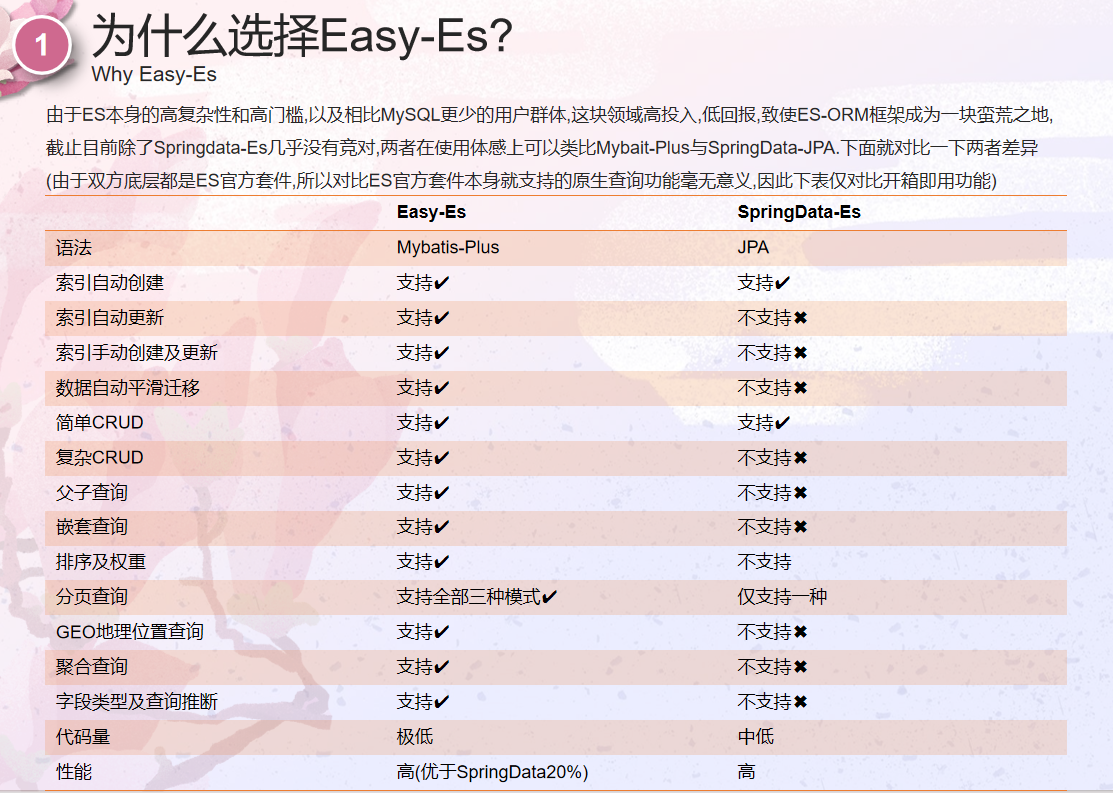
Easy-es
title: Easy-es id: bf997874-bc8d-451b-b68a-b40abbf61eea date: 2024-12-11 00:15:11 auther: halo-yan cover: /upload/59495732c214121f20e86b4126d116ed.jpg
knife4j
knife4j 1.介绍 knife4j 集成 微服务模板工程 pom 可直接使用 高内聚低耦合 2.项目结构 framework-knife4J
└─src
└─main
├─java
│ └─com
│ └─yan
│
Linux 设置默认显示管理器
Linux 设置默认显示管理器 Linux-mint --> lightdm Ubuntu --> gdm3 sudo dpkg-reconfigure lightdm
Linux mint 下载fcitx输入法 导致输入法异常不可用修复
Linux mint 下载fcitx输入法 导致输入法异常不可用修复 事情的起因是我想用搜狗输入法,发现搜狗输入法只能配合fcitx使用,
于是乎我下了个fcitx 然后事情就大条了 输入法直接不能用了 只能打英文
将ibus和fcitx都先移除 重新下载ibus 关于环境变量的移除 移除
~/.
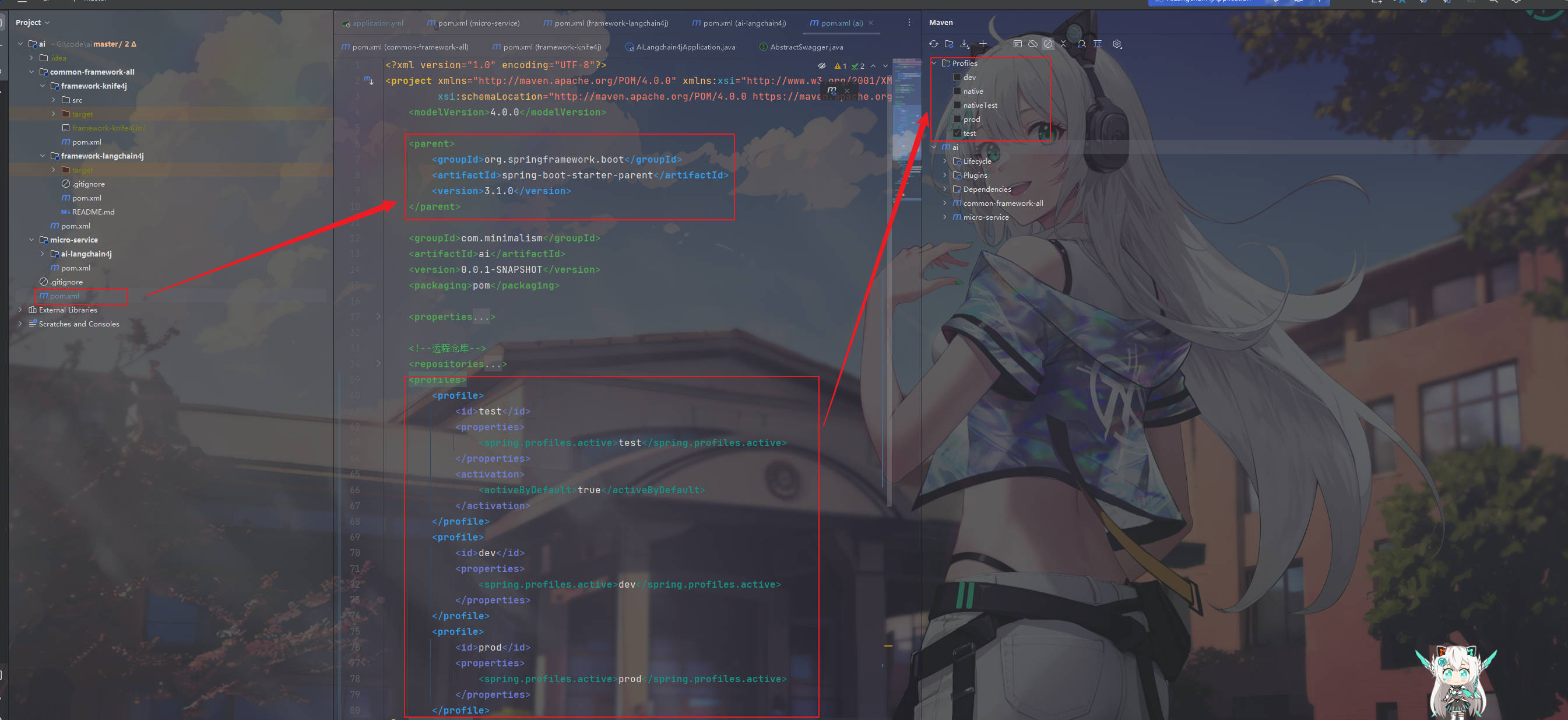
maven 配置 profiles
maven 配置 profiles 1.pom 使用 结构1 最父级parent 方案 1.1 以以下项目演示 ai
├─common-framework-all
│ ├─framework-knife4j
│ │ └─src
│ │ └─main
│ │ ├─
MyBatisCodeHelper-Pro 破解教程
MyBatisCodeHelper-Pro 破解教程 免责声明 本软件和技术仅供学习和研究使用,禁止将其用于商业用途。如果您使用本软件和技术用于商业化而产生任何损失、风险或法律纠纷,作者将不承担任何责任。 作者不保证本软件和技术的完整性、准确性、可靠性、适用性或及时性。使用本软件和技术产生的任何后果
[nginx] ssl 证书申请配置
https ssl申请 免费证书申请 先购买测试证书
Ollama docker 安装部署
Ollama docker 安装部署 1.安装Ollama 备注:我的开发服务器没有显卡,所以只能用CPU来跑。 如果您的机器支持GPU,可添加GPU参数支持,参考:https://hub.docker.com/r/ollama/ollama 1.1方式一:编辑 docker-compose.yml
Spring Boot IP 封禁系统实现
Spring Boot IP 封禁系统实现 这是一个基于 Spring Boot 和 Redisson 的 IP 封禁系统,支持三种封禁类型(全局 IP 封禁、接口封禁、IP+接口封禁),通过单一注解 @Ban 实现,结合白名单和黑名单功能。白名单和黑名单通过 application.yml 配置,